Skip to content
Compare Wix vs Squarespace vs WordPress in 2026. Discover features, SEO, pricing, ease of use, and find the best platform for your website.
Wix vs Squarespace vs WordPress
Choosing the right website builder can determine how successful your website becomes. Whether you’re launching a personal blog, an online store, a business website, or a portfolio, selecting the best platform matters for SEO, performance, customization, and long-term growth.
The Wix vs Squarespace vs WordPress comparison is one of the most searched topics because each platform serves different types of users. Wix focuses on simplicity, Squarespace emphasizes beautiful designs, while WordPress provides unmatched flexibility and complete ownership.
In this comprehensive guide, we’ll compare every important aspect including pricing, ease of use, SEO, blogging, eCommerce, customization, security, performance, scalability, and much more.
Quick Comparison Table
| Feature | Wix | Squarespace | WordPress |
|---|---|---|---|
| Ease of Use | ⭐⭐⭐⭐⭐ | ⭐⭐⭐⭐☆ | ⭐⭐⭐☆☆ |
| SEO | ⭐⭐⭐⭐☆ | ⭐⭐⭐⭐☆ | ⭐⭐⭐⭐⭐ |
| Blogging | ⭐⭐⭐⭐☆ | ⭐⭐⭐⭐☆ | ⭐⭐⭐⭐⭐ |
| Design Templates | ⭐⭐⭐⭐☆ | ⭐⭐⭐⭐⭐ | ⭐⭐⭐⭐⭐ |
| Customization | ⭐⭐⭐☆☆ | ⭐⭐⭐☆☆ | ⭐⭐⭐⭐⭐ |
| Plugins & Extensions | ⭐⭐⭐☆☆ | ⭐⭐☆☆☆ | ⭐⭐⭐⭐⭐ |
| eCommerce | ⭐⭐⭐⭐☆ | ⭐⭐⭐⭐☆ | ⭐⭐⭐⭐⭐ |
| Performance | ⭐⭐⭐⭐☆ | ⭐⭐⭐⭐☆ | ⭐⭐⭐⭐⭐ |
| Scalability | ⭐⭐⭐☆☆ | ⭐⭐⭐☆☆ | ⭐⭐⭐⭐⭐ |
| Best Overall | Good | Very Good | Excellent |
Winner: WordPress
What Is Wix?
Wix is a cloud-based website builder designed for beginners. It provides a drag-and-drop editor, built-in hosting, templates, and maintenance, making it ideal for users with no coding knowledge.
Best For
- Small businesses
- Personal websites
- Beginners
- Landing pages
- Local businesses
Pros
- Beginner-friendly interface
- Fast website setup
- Free plan available
- Hundreds of templates
- Hosting included
Cons
- Limited flexibility
- Difficult to migrate away
- Advanced customization is restricted
- SEO improvements still trail WordPress
What Is Squarespace?
Squarespace is an all-in-one website builder known for elegant templates and professional-looking designs.
It combines hosting, templates, security, and updates into one package.
Best For
- Photographers
- Designers
- Creative agencies
- Restaurants
- Portfolio websites
Pros
- Premium-looking templates
- Excellent mobile responsiveness
- Built-in analytics
- Strong blogging tools
- Reliable hosting
Cons
- Limited third-party integrations
- Smaller app ecosystem
- Less customizable than WordPress
- Higher monthly pricing
What Is WordPress?
WordPress is the world’s most popular Content Management System (CMS), powering over 40% of all websites.
Unlike Wix or Squarespace, WordPress is open-source software that gives complete control over every aspect of your website.
You can install thousands of themes, plugins, SEO tools, page builders, and customize everything without limitations.
Best For
- Bloggers
- Businesses
- WooCommerce stores
- Agencies
- Developers
- Membership websites
- News websites
- Enterprise businesses
Pros
- Completely customizable
- Best SEO capabilities
- Huge plugin ecosystem
- Thousands of themes
- Own your website and data
- Unlimited scalability
Cons
- Requires web hosting
- Learning curve for beginners
- Responsible for updates and maintenance
Ease of Use
Wix
Wix offers one of the easiest drag-and-drop editors available. Anyone can create a website within hours.
Winner: Wix
Squarespace
Squarespace is also beginner-friendly but follows a structured editing system. It offers less freedom than Wix but produces more consistent designs.
Winner: Squarespace
WordPress
WordPress requires a little more learning because users manage hosting, plugins, themes, and updates. However, builders like Elementor, Gutenberg, and Beaver Builder make website creation much easier.
Winner: WordPress (for long-term flexibility)
Design and Templates
Wix
- 900+ templates
- Drag-and-drop editor
- Modern designs
Squarespace
Squarespace is widely considered the leader in professional website templates.
Its designs are clean, responsive, and perfect for creative professionals.
WordPress
WordPress offers thousands of free and premium themes.
Popular options include:
- Astra
- Kadence
- GeneratePress
- OceanWP
- Block themes
- Elementor templates
Winner: WordPress
SEO Comparison
SEO is where many website owners make their decision.
Wix SEO
Wix has improved significantly.
Features include:
- Custom URLs
- Meta titles
- Meta descriptions
- Redirects
- XML sitemap
- Robots.txt
- Canonical URLs
However, advanced technical SEO remains limited.
Squarespace SEO
Squarespace includes:
- Automatic sitemap
- SSL certificate
- Mobile optimization
- Clean URLs
- Basic schema support
It performs well but lacks deep customization.
WordPress SEO
WordPress dominates SEO because you control everything.
Popular SEO plugins include:
- Yoast SEO
- Rank Math
- All in One SEO
Advanced SEO features include:
- Schema markup
- Internal linking optimization
- Redirect management
- Breadcrumbs
- XML sitemaps
- Robots.txt editing
- Custom canonical tags
- Core Web Vitals optimization
- Image optimization
- SEO audits
- AI-assisted content optimization
If your goal is ranking higher on Google, WordPress is the strongest option.
Winner: WordPress
Blogging Features
Wix
Good blogging tools with categories, tags, scheduling, and comments.
Squarespace
Provides a polished blogging experience suitable for creators and small businesses.
WordPress
Originally created for blogging, WordPress still offers the best publishing experience with powerful content management, revisions, custom post types, editorial workflows, and extensive plugin support.
Winner: WordPress
eCommerce Comparison
Wix Stores
Suitable for:
- Small shops
- Digital downloads
- Local businesses
Squarespace Commerce
Excellent for stylish online stores with built-in inventory management.
WooCommerce (WordPress)
WooCommerce is the most flexible eCommerce solution available.
Benefits include:
- Unlimited products
- Multiple payment gateways
- Advanced shipping
- Subscription products
- Membership sites
- Multi-vendor marketplaces
- Dropshipping integrations
- Thousands of WooCommerce extensions
Winner: WordPress
Customization
Wix
Customization is limited to the tools Wix provides.
Squarespace
Allows styling changes but remains within predefined structures.
WordPress
WordPress lets you customize virtually everything:
- Themes
- Plugins
- CSS
- PHP
- JavaScript
- APIs
- Custom post types
- Gutenberg blocks
- Full Site Editing
- Child themes
Winner: WordPress
Performance
Website speed depends on optimization.
Wix
Generally fast because hosting is managed.
Squarespace
Reliable performance with built-in optimization.
WordPress
With quality hosting, caching, CDN integration, image optimization, and lightweight themes, WordPress can outperform both Wix and Squarespace.
Winner: WordPress
Security
Wix
Handles updates and security automatically.
Squarespace
Also manages security and server maintenance.
WordPress
Security depends on your hosting provider, plugins, passwords, firewall, backups, and maintenance practices. With proper management, WordPress is highly secure.
Winner: Tie
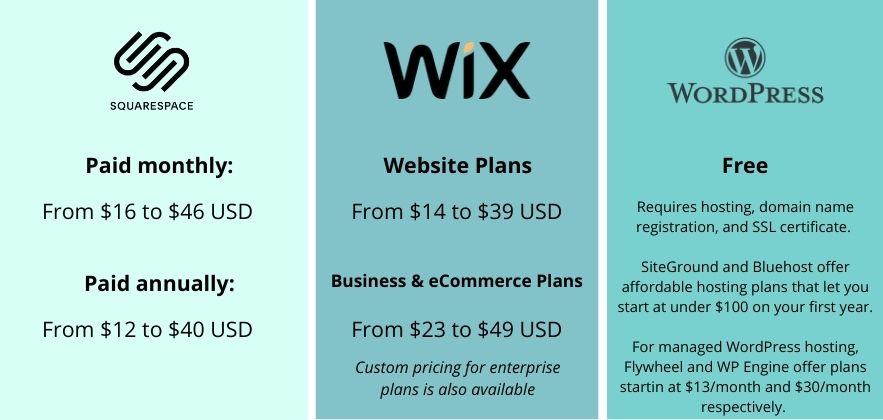
Pricing Comparison
| Platform | Starting Cost |
|---|---|
| Wix | Low monthly subscription |
| Squarespace | Mid-range monthly subscription |
| WordPress | Software is free (hosting and domain required) |
While WordPress requires hosting, it often delivers better long-term value because you aren’t locked into a proprietary platform and can scale as your needs grow.
Winner: WordPress
Scalability
As your website grows, scalability becomes critical.
Wix
Good for small to medium websites.
Squarespace
Ideal for growing businesses but has platform limitations.
WordPress
Suitable for:
- Personal blogs
- Corporate websites
- Universities
- Government portals
- Large eCommerce stores
- High-traffic news sites
- Membership communities
WordPress scales from a simple blog to enterprise-level websites.
Winner: WordPress
Who Should Choose Wix?
Choose Wix if you:
- Need a website today
- Have no technical experience
- Want everything managed for you
- Run a small business
- Prefer simplicity over customization
Winner: Wix
Who Should Choose Squarespace?
Squarespace is ideal if you:
- Value premium design
- Need a professional portfolio
- Are a photographer or designer
- Want built-in hosting with minimal maintenance
Winner: Squarespace
Who Should Choose WordPress?
WordPress is the best choice if you:
- Want complete ownership
- Care about SEO
- Plan to grow your business
- Need advanced customization
- Want the largest ecosystem of themes and plugins
- Intend to build a WooCommerce store
- Need multilingual support, membership features, or custom functionality
Winner: WordPress
Wix vs Squarespace vs WordPress: Pros and Cons
| Platform | Advantages | Disadvantages |
|---|---|---|
| Wix | Easy setup, hosting included, beginner-friendly | Less flexible, limited scalability |
| Squarespace | Beautiful templates, reliable hosting | Smaller extension ecosystem |
| WordPress | Unlimited customization, best SEO, scalable, huge community | Requires hosting and maintenance |
Frequently Asked Questions
Is WordPress better than Wix?
Yes. WordPress offers superior SEO, customization, scalability, and ownership, making it the better choice for most websites.
Is Squarespace better than Wix?
Squarespace generally provides more polished templates and stronger design tools, while Wix offers a more flexible editor.
Which platform is best for SEO?
WordPress consistently delivers the best SEO performance thanks to advanced optimization options, powerful plugins, and full control over technical SEO.
Which platform is cheapest?
WordPress software is free, but you’ll need hosting and a domain. Wix and Squarespace include hosting in their subscription plans.
Which platform is best for blogging?
WordPress remains the leading platform for bloggers due to its powerful publishing tools, content organization, and SEO capabilities.
Which platform is best for an online store?
WooCommerce on WordPress is the most flexible solution for businesses that want full control and room to grow.
Final Verdict
When comparing Wix vs Squarespace vs WordPress, the right choice depends on your goals.
If you need the easiest way to launch a basic website, Wix is a solid option. If you prioritize elegant design and an all-in-one experience, Squarespace is an excellent choice. However, if you want the best SEO, complete customization, advanced blogging, powerful eCommerce capabilities, and the flexibility to scale from a small blog to a large business website, WordPress stands out as the clear winner.
For anyone planning to build a long-term online presence, WordPress offers the greatest value and the freedom to grow without platform limitations.
Overall Winner: WordPress
External Resources
| Resource | Purpose |
|---|---|
| https://wordpress.org | Official WordPress CMS |
| https://woocommerce.com | WooCommerce eCommerce platform |
| https://wordpress.com/support/seo | WordPress SEO guide |
| https://developers.google.com/search | Google Search Central SEO documentation |
| https://pagespeed.web.dev | Google PageSpeed Insights |
| https://yoast.com | SEO optimization resources |
| https://rankmath.com | WordPress SEO plugin |
| https://www.wix.com | Official Wix website |
| https://www.squarespace.com | Official Squarespace website |