Skip to content
Compare Elementor vs Elementor Pro features, pricing, templates, and performance to choose the best WordPress page builder for your website.
Elementor vs Elementor Pro: Which One Should You Choose?
If you’re building a WordPress website, you’ve probably come across Elementor vs Elementor Pro while searching for the best page builder. Elementor is one of the most popular drag-and-drop website builders, allowing beginners and professionals to create stunning websites without writing code.
The free version of Elementor is powerful enough for basic websites, but Elementor Pro unlocks advanced widgets, premium templates, WooCommerce customization, theme building, popup creation, and many other professional features. Choosing between the two depends on your website goals, budget, and the features you actually need.
In this detailed comparison, we’ll explore the differences between Elementor Free and Elementor Pro, compare their features, pricing, performance, ease of use, and help you decide which version offers the best value for your WordPress website.
What Is Elementor?
Elementor is a visual WordPress page builder plugin that lets you design pages using a drag-and-drop interface. Instead of editing content inside the default WordPress editor, Elementor allows you to build pages visually and instantly see every change.
Whether you’re creating:
- Business websites
- Personal blogs
- Portfolio websites
- Landing pages
- WooCommerce stores
- Agency websites
Elementor makes the entire design process much easier.
Some of its most popular features include:
- Drag-and-drop page builder
- Live front-end editing
- Responsive controls
- Basic widgets
- Ready-made templates
- Mobile-friendly editing
- Fast learning curve
Millions of WordPress websites use Elementor because it provides an excellent balance between flexibility and simplicity.
What Is Elementor Pro?
Elementor Pro is the premium version of Elementor. It includes everything available in the free plugin while adding professional tools for designers, freelancers, agencies, developers, and online businesses.
With Elementor Pro, you can customize every part of your website instead of only editing individual pages.
The Pro version adds features like:
- Theme Builder
- Header & Footer Builder
- WooCommerce Builder
- Popup Builder
- Form Builder
- Dynamic Content
- Motion Effects
- Custom CSS
- Role Manager
- Global Widgets
- Premium Templates
- Premium Widgets
These advanced features eliminate the need for multiple third-party plugins, making website management much easier.
Elementor Free vs Elementor Pro: Quick Comparison
| Feature | Elementor Free | Elementor Pro |
|---|---|---|
| Drag & Drop Editor | ✅ | ✅ |
| Live Editing | ✅ | ✅ |
| Responsive Design | ✅ | ✅ |
| Basic Widgets | ✅ | ✅ |
| Premium Widgets | ❌ | ✅ |
| Theme Builder | ❌ | ✅ |
| Popup Builder | ❌ | ✅ |
| Form Builder | ❌ | ✅ |
| WooCommerce Builder | ❌ | ✅ |
| Header & Footer Builder | ❌ | ✅ |
| Dynamic Content | ❌ | ✅ |
| Custom CSS | ❌ | ✅ |
| Premium Templates | Limited | Hundreds |
As you can see, Elementor Free is ideal for simple websites, while Elementor Pro is designed for users who want complete design freedom and advanced functionality.
Key Features of Elementor Free
The free version is surprisingly capable and can be enough for many users.
Some of its main features include:
1. Drag-and-Drop Builder
You can simply drag widgets onto your page and arrange them however you like without touching any code.
2. Live Editing
Every change appears instantly, making website design much faster than using the default WordPress editor.
3. Basic Widgets
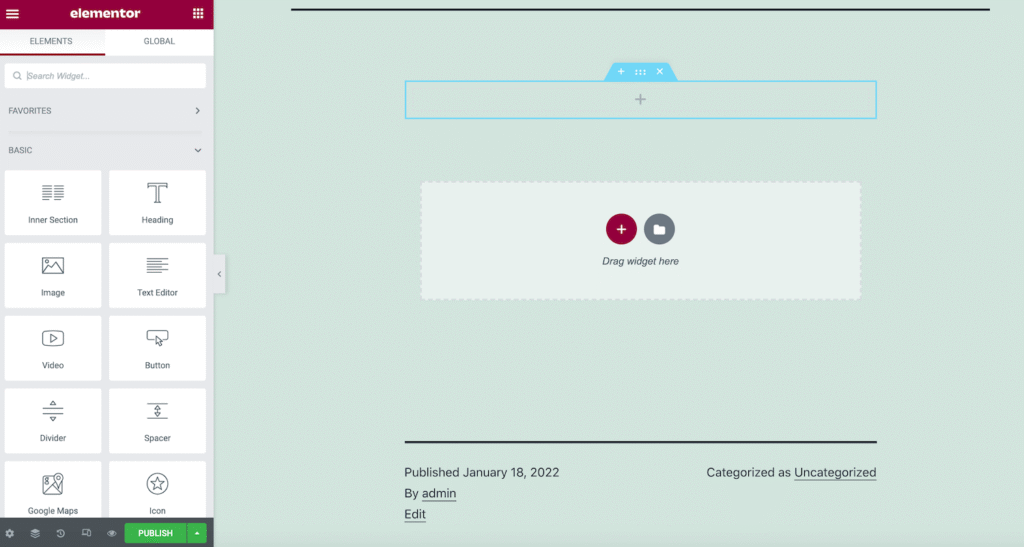
Elementor Free includes useful widgets such as:
- Heading
- Text Editor
- Image
- Video
- Button
- Divider
- Spacer
- Google Maps
- Icon
- Gallery
- Image Box
- Icon Box
- Progress Bar
- Testimonial
- Social Icons
These widgets are enough for creating attractive landing pages and business websites.
4. Responsive Editing
You can preview and customize your website separately for:
- Desktop
- Tablet
- Mobile
This helps ensure your website looks professional on every device.
5. Template Library
Elementor Free also provides a collection of ready-made page templates and blocks that save time during website creation.
Who Should Use Elementor Free?
Elementor Free is a great choice if you:
- Have a personal blog
- Need a portfolio website
- Run a small business website
- Want a simple landing page
- Are learning WordPress
- Have a limited budget
- Don’t need advanced customization
For many beginners, the free version provides everything needed to launch a professional-looking website.
Elementor Pro Features Explained
While Elementor Free is excellent for basic websites, Elementor Pro is designed for users who need complete control over their WordPress site’s design and functionality. It adds professional tools that can replace several standalone plugins, helping you build a more streamlined and feature-rich website.
Let’s explore the features that make Elementor Pro worth considering.
1. Theme Builder
The Theme Builder is one of the biggest reasons users upgrade to Elementor Pro.
Instead of being limited to editing individual pages, you can visually design your entire WordPress website, including:
- Header
- Footer
- Single blog posts
- Archive pages
- Search results
- Category pages
- Author pages
- 404 page
Everything can be customized using the same drag-and-drop interface.
Best For
- Business websites
- Blogs
- News websites
- Custom WordPress projects
- Agencies
2. Header & Footer Builder
With Elementor Free, you’re usually restricted by your WordPress theme when it comes to editing the header and footer.
Elementor Pro removes that limitation.
You can create completely custom:
- Navigation menus
- Sticky headers
- Transparent headers
- Mega-style layouts
- Multi-column footers
- Contact footers
- Social media sections
This allows you to maintain consistent branding across your entire website.
3. WooCommerce Builder
If you’re running an online store, Elementor Pro includes a dedicated WooCommerce Builder.
Instead of relying on your theme’s default product pages, you can customize:
- Product pages
- Shop page
- Product archives
- Checkout layouts (with compatible setups)
- Cart layouts (with compatible setups)
- Product categories
- Related products
- Upsells and cross-sells
This is especially useful for businesses looking to create a unique shopping experience that aligns with their brand.
4. Form Builder
One of Elementor Pro’s most valuable features is the built-in Form Builder.
Instead of installing a separate contact form plugin, you can create forms directly within Elementor.
Supported form types include:
- Contact forms
- Quote request forms
- Appointment forms
- Newsletter signup forms
- Feedback forms
- Registration forms
- Multi-field inquiry forms
It also supports integrations with many popular email marketing and automation services, making it easier to collect leads and manage customer inquiries.
5. Popup Builder
Another standout feature is the Popup Builder.
You can create visually appealing popups without needing an additional popup plugin.
Common use cases include:
- Email subscription popups
- Exit intent offers
- Discount coupons
- Cookie notices
- Promotional announcements
- Welcome popups
- Age verification popups
You can also define display conditions, such as showing a popup on specific pages or after a visitor performs certain actions.
6. Premium Widgets
Elementor Free includes a solid collection of basic widgets, but Elementor Pro expands your design options with many advanced widgets.
Some of the most popular Pro widgets include:
- Posts
- Portfolio
- Slides
- Price Table
- Price List
- Call to Action
- Flip Box
- Media Carousel
- Testimonial Carousel
- Login Form
- Nav Menu
- Search Form
- Share Buttons
- Animated Headline
- Countdown Timer
- Facebook Embed
- Blockquote
- Lottie Animation
- Table of Contents
These widgets make it easier to create professional websites without additional plugins.
7. Dynamic Content
Dynamic Content is particularly useful for advanced websites.
It allows you to automatically display information from WordPress, custom fields, and other data sources.
Examples include:
- Author names
- Featured images
- Custom fields
- Post metadata
- Product information
- User details
- Dynamic URLs
This feature is especially valuable for directory websites, real estate listings, membership sites, and other content-rich projects.
8. Custom CSS
Developers and advanced users can add custom CSS directly to widgets, sections, or containers.
This provides greater flexibility for:
- Fine-tuning layouts
- Creating custom hover effects
- Adjusting spacing
- Applying unique animations
- Matching brand guidelines
Without Elementor Pro, achieving similar customizations often requires editing theme files or using extra plugins.
9. Motion Effects & Animations
Modern websites often use subtle animations to improve user engagement.
Elementor Pro includes advanced motion effects such as:
- Scroll effects
- Mouse tracking effects
- Entrance animations
- Sticky elements
- Transform effects
- Floating elements
- Interactive animations
When used thoughtfully, these effects can enhance the overall user experience without overwhelming visitors.
10. Global Widgets
If you use the same design element across multiple pages, Global Widgets can save significant time.
For example, you might create a:
- Call-to-action section
- Contact block
- Pricing box
- Newsletter signup
- Testimonial section
You only need to edit it once, and the changes automatically apply wherever that Global Widget is used.
This is especially helpful for agencies and websites with many pages.
When Is Elementor Pro Worth It?
Elementor Pro is generally worth upgrading if you:
- Build websites for clients.
- Manage multiple WordPress websites.
- Need custom headers and footers.
- Run an online WooCommerce store.
- Want advanced lead generation forms.
- Require professional popup campaigns.
- Need dynamic content for custom post types.
- Prefer replacing multiple plugins with one integrated solution.
For users with basic websites, Elementor Free may be sufficient. However, if your site is growing or you need advanced customization, Elementor Pro can save time and simplify website management.
Elementor vs Elementor Pro Pricing
One of the biggest factors when choosing between Elementor vs Elementor Pro is the price. While the free version costs nothing, Elementor Pro is available through annual subscription plans that include premium features, updates, and support.
If you’re creating a simple personal website or blog, Elementor Free is often enough. However, if you need advanced tools like Theme Builder, Popup Builder, WooCommerce Builder, or premium widgets, upgrading to Elementor Pro can provide much better value.
Since Elementor occasionally updates its pricing and licensing plans, it’s best to check the latest plans on the official website before purchasing.
Performance Comparison
Website speed is important for both SEO and user experience. Many people assume Elementor Pro is slower because it includes more features, but performance depends more on how you build your website than whether you’re using the free or Pro version.
Elementor Free Performance
Elementor Free performs well for:
- Small business websites
- Personal blogs
- Landing pages
- Portfolio websites
Since it includes fewer widgets and features, websites often remain lightweight when built with good optimization practices.
Elementor Pro Performance
Elementor Pro adds more functionality, but it doesn’t automatically make your website slow.
A well-optimized Elementor Pro website can still achieve excellent loading speeds when you:
- Use lightweight hosting.
- Compress and optimize images.
- Enable page caching.
- Minify CSS and JavaScript files.
- Limit unnecessary animations.
- Remove unused plugins.
- Use a quality CDN.
The biggest impact on performance usually comes from oversized images, excessive third-party plugins, and poor hosting—not Elementor Pro itself.
Elementor Free Pros and Cons
Pros
- Completely free to use
- Beginner-friendly interface
- Easy drag-and-drop editing
- Responsive design controls
- Good selection of basic widgets
- Suitable for small websites
- Large community and documentation
Cons
- No Theme Builder
- No Popup Builder
- No Form Builder
- No WooCommerce Builder
- Limited templates
- No Dynamic Content
- Fewer customization options
Elementor Pro Pros and Cons
Pros
- Complete website customization
- Premium widgets
- Theme Builder
- Header and Footer Builder
- WooCommerce Builder
- Popup Builder
- Built-in Form Builder
- Dynamic Content support
- Custom CSS
- Global Widgets
- Regular updates and premium support
Cons
- Requires a paid subscription
- Some advanced features have a learning curve
- May be unnecessary for very simple websites
Elementor vs Elementor Pro: Which One Is Best for Beginners?
For most beginners, Elementor Free is the best place to start. It offers an intuitive interface, essential widgets, and enough flexibility to build attractive websites without spending any money.
As your website grows, you may find that you need features such as:
- Custom headers and footers
- Advanced forms
- Popups
- WooCommerce customization
- Dynamic templates
- More design flexibility
At that point, upgrading to Elementor Pro becomes a practical investment, especially if it allows you to replace several separate plugins with one integrated solution.
Frequently Asked Questions
Is Elementor Free enough for a business website?
Yes. Elementor Free is suitable for many small business websites that need standard pages such as Home, About, Services, and Contact. If you require advanced marketing features or custom site-wide templates, Elementor Pro offers additional capabilities.
Can I upgrade from Elementor Free to Elementor Pro later?
Yes. You can start with the free version and upgrade whenever you need premium features. Your existing designs remain intact after upgrading.
Does Elementor Pro replace other plugins?
In many cases, yes. Elementor Pro includes tools such as a Form Builder, Popup Builder, Theme Builder, and WooCommerce Builder, which can reduce the need for separate plugins depending on your website’s requirements.
Is Elementor Pro worth the money?
If you’re a freelancer, agency, online store owner, or someone building multiple WordPress websites, Elementor Pro can provide significant value through its advanced design tools and integrated features.
Which version is better for WooCommerce?
Elementor Pro is the better choice because it includes WooCommerce Builder, allowing you to customize product pages, shop layouts, and other store templates visually.
Final Verdict
When comparing Elementor vs Elementor Pro, there isn’t a single answer that fits everyone. The right choice depends on your website’s goals and the level of customization you need.
Choose Elementor Free if you:
- Are new to WordPress.
- Have a personal blog or portfolio.
- Need a simple business website.
- Want to build pages without any cost.
Choose Elementor Pro if you:
- Build websites professionally.
- Need complete control over your site’s design.
- Run an eCommerce store.
- Want premium widgets and templates.
- Need advanced forms, popups, and dynamic content.
- Prefer an all-in-one page builder that can reduce reliance on multiple plugins.
For basic websites, Elementor Free is more than capable. For growing businesses, agencies, and online stores, Elementor Pro offers a broader set of tools that can streamline website creation and ongoing management.
External Resources
| Resource | Purpose |
|---|---|
| https://elementor.com/ | Official Elementor website |
| https://elementor.com/help/ | Elementor Help Center |
| https://wordpress.org/plugins/elementor/ | Elementor Free plugin on WordPress.org |
| https://developer.wordpress.org/ | WordPress Developer Documentation |
| https://wordpress.org/support/plugin/elementor/ | Elementor community support forum |